
Easeful Themes for ACF displays every common Advanced Custom Fields field type on the front end, each in a way suited to its content, so a link is clickable, an image shows as an image and a list of choices shows as tags.
You can see all of them at once in the theme editor: go to ACF → Themes, open any theme and leave ‘Preview with’ on ‘Sample content (every field type)’. The preview fills each field with placeholder content, in the theme you’re looking at.
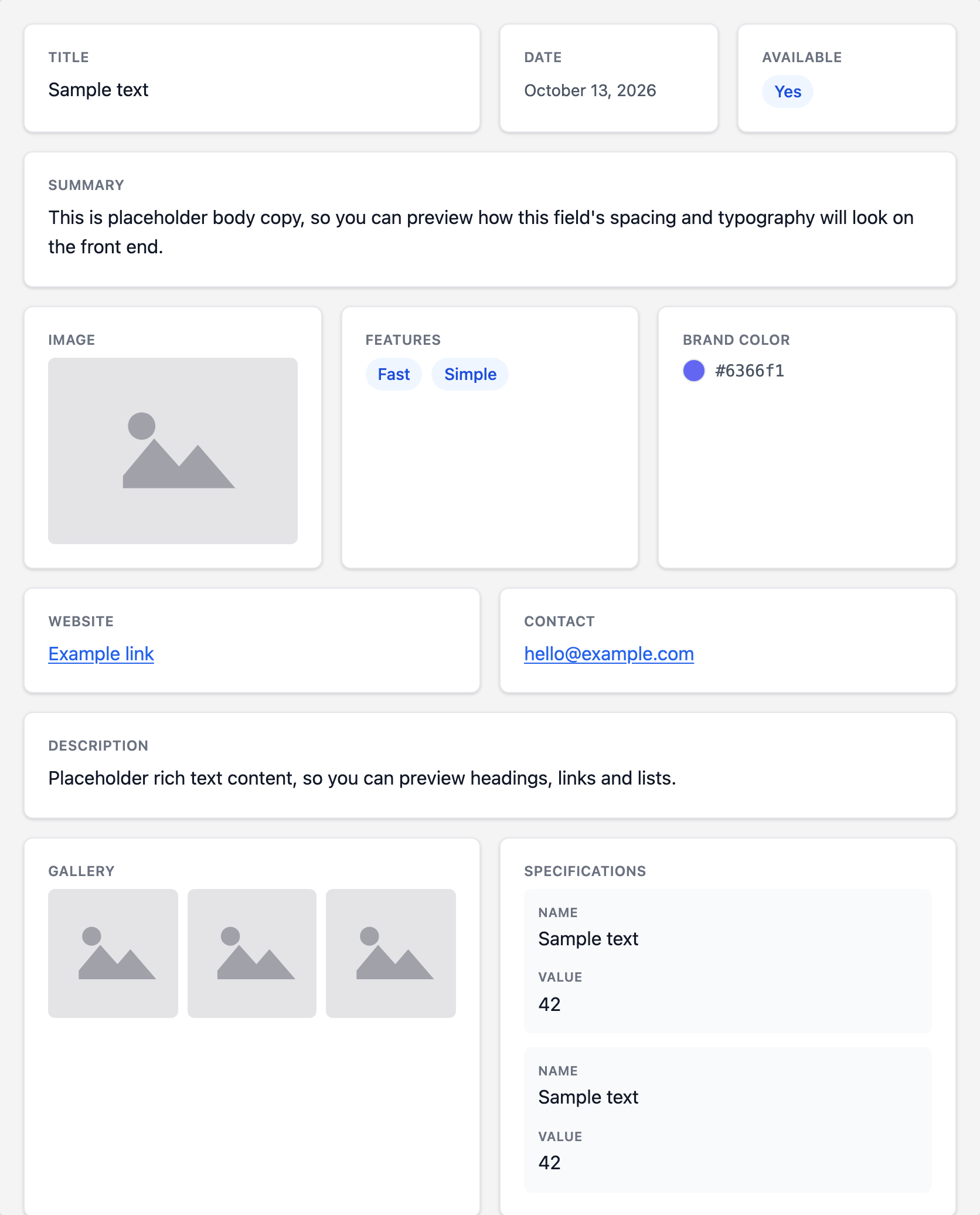
How Each Field Type Appears #
Text and numbers:
- ‘Text’, ‘Number’ and ‘Range’ — the value as plain text.
- ‘Text Area’ — the text, keeping its line breaks.
- ‘Email’ — a link that opens the visitor’s email app.
- ‘URL’ — a link to the address, opening in a new tab.
- ‘WYSIWYG Editor’ — the formatted content, with its headings, lists and links.
Choices:
- ‘Select’, ‘Checkbox’, ‘Radio Button’ and ‘Button Group’ — one tag per chosen option.
- ‘True / False’ — a ‘Yes’ or ‘No’ badge.
Dates and colors:
- ‘Date Picker’, ‘Date Time Picker’ and ‘Time Picker’ — the date or time in the ‘Return Format’ set on the field in ACF, so change the format there to change it on the front end.
- ‘Color Picker’ — a round swatch of the color next to its code.
Media:
- ‘Image’ — the image at WordPress’s medium size, with its alt text.
- ‘Gallery’ — a grid of square thumbnails.
- ‘File’ — a download link showing the file name.
- ‘oEmbed’ — the embedded video, post or other content. Embeds that need the provider’s own script, like posts from X or Instagram, show as a quote with a link to the original.
Links and relationships:
- ‘Link’ — a link with its own title, opening in a new tab when that option is ticked on the link.
- ‘Post Object’, ‘Relationship’ and ‘Page Link’ — one tag per post or page, linking to it.
- ‘Taxonomy’ — one tag per term, linking to its archive page.
- ‘User’ — each user’s avatar and name.
Layout fields:
- ‘Group’ — its sub fields one under the other, each with its own label.
- ‘Repeater’ — one row per entry, each listing its sub fields.
- ‘Flexible Content’ — one row per layout, each listing that layout’s sub fields.
Sub fields inside a group, repeater or flexible content field are displayed with the same rules as top-level fields, but always at full width; only top-level fields have a width setting in the Design tab. Repeater, Flexible Content and Gallery fields are part of ACF PRO.
What Isn’t Displayed #
- ‘Password’ fields are never shown on the front end, whatever their value.
- A field with no value on a post is skipped, along with its label and card, so empty fields never leave gaps.
- Fields that hold no value of their own, such as ‘Message’, ‘Tab’ and ‘Accordion’, don’t appear.
Field types not listed above, including ones added by other plugins, still appear: Easeful Themes for ACF shows their value as text when it can, such as a Google Map field’s address. To give one of them a proper design, a developer can override the fallback template and handle that field type there, as explained in the article on customizing the markup.


